

Productivity tools promise a lot. Few actually deliver. Notion AI sits in that rare group that genuinely changes how people work. It is not just another AI add-on. It is a deeply integrated assistant inside one of the world’s most popular workspaces.
Simply put, Notion AI will help you Write Faster, think more clearly, and organize your work more effectively without switching tools. It exists in Notion and works within your current notes, tasks, and documents.
We break down Notion AI – Productivity and Automation Capabilities into simple terms. Not a hype. Fluff-free. Here’s what works, what doesn’t, and who should use it.
What Is Notion AI?
The Notion AI is an AI assistant that is developed as a part of the Notion workspace. It assists the users in writing, summarizing, brainstorming, translating, and Automating Routine Content Activities.
Picture this: You type a rough idea. Notion AI refines it into polished text. Or you dump a long meeting transcript. It pulls out key action items. Launched in 2023, it’s evolved by 2025. It can now transcribe voice recordings in your phone calls, as well as chat with your data in apps like Slack or Google Drive.
Why does this matter?
In a world full of apps, Notion AI keeps everything in one spot. No more copying and pasting. It learns from your pages. Over time, suggestions get sharper. For me, that meant less time hunting for old ideas. More time creating.
Work is messy. Teams juggle notes, tasks, emails, and docs across multiple apps. Context gets lost fast. Notion AI solves this by working exactly where the work happens. As such, it saves time and eases the burden on the mind.
However, it’s not magic. You still guide it. Prompts matter. A vague task gets vague results. Clear ones? Gold.
Key Features That Drive Productivity
Let’s talk about features. Notion AI shines in a few spots. I’ll define each one quickly, then unpack how it works in real life.
AI writing and editing
AI writing tools in Notion help you start, improve, and repurpose content. Notion blocks or pages can contain them.
- Write first posts on a blog, emails, meeting notes, and project documents.
- Rebook, compress, elaborate, or switch tone to suit your writing style standards.
- Incorrect spelling or grammar can be fixed with a single click, followed by attempts to improve content using follow-up questions.
Since Notion AI stands on the shoulders of your current content, it does not alter the structure, headings, and formatting and makes it easier to understand and read. This reduces manual editing time and helps non‑writers create clean text.
2. AI summaries and meeting notes
Summaries are where Notion AI – Productivity and Automation Capabilities really stand out for busy teams. Notion AI can scan long pages and convert them into short, useful overviews.
- Summarize Meeting Notes with clear action items and decisions.
- Turn long research pages into brief summaries for quick review.
Additionally, content creators use this feature to condense research into key points or to generate executive summaries for reports and strategy docs. This speeds up decision‑making and reduces time spent reading.
3. AI search and knowledge discovery
Notion’s AI‑powered search goes beyond simple keyword matching. It allows you to use natural language, like “show me our Q3 launch plan” or “find notes about pricing tests.”
- Natural language search understands intent and context instead of needing exact words.
- AI database properties can auto‑generate summaries, tags, or keywords for entries, making information easier to filter and find later.
- Enterprise search can pull information across spaces and large workspaces, which helps big teams.
As a result, knowledge is not locked away in old docs. Teams can discover relevant pages faster, which boosts productivity and reduces repeated work.
Automation Capabilities in Notion AI
Automation in Notion combines rules, Database Triggers, and AI smarts. The goal is to cut repetitive manual steps in daily workflows.
1. AI database properties and smart autofill
AI database properties are special fields that use AI to fill or update values based on other content in the same row.
For example, you can:
- Auto‑generates a summary of a long ticket description.
- Extract key keywords or topics from a customer request.
- Translate text into another language in a separate property.
This is a clear example of Notion AI – Productivity and Automation Capabilities, since it removes the need to manually tag, summarize, or reformat entries. In turn, your databases stay clean and searchable with less effort.
2. Database automations and workflows
Beyond AI properties, Notion supports rule‑based automations like “when status changes, do X.” AI can be combined with these flows to perform smart actions.
Typical use cases include:
- When a task moves to “Done,” auto‑generates a short summary and learnings.
- When a new support ticket is logged, tag it with sentiment or topic.
- When a content draft is marked “Review,” create an AI‑generated checklist for editors.
Therefore, Notion becomes a light workflow engine where both logic and intelligence work together. This helps teams standardize processes without heavy, code‑based automation tools.
3. AI‑powered templates and repeatable systems
Many creators share templates that already include AI prompts and properties. These cover areas like content calendars, product roadmaps, hiring pipelines, and sales CRM.
When you duplicate such templates, AI is ready to help with:
- Auto‑filling descriptions and next steps based on a few fields.
- Drafting outreach messages, job posts, or feature descriptions.
- Summarizing campaign performance or weekly updates.
Moreover, teams can standardize how AI should respond inside their own templates, which keeps tone and workflows consistent across projects.
Notion AI for Team Productivity
Collaboration Gets Smarter
Teams often struggle with alignment. Notion AI improves collaboration by making content clearer and more structured.
For example:
- Meeting notes become summaries
- Ideas turn into action items
- Docs stay consistent in tone
As a result, fewer follow-ups are needed.
Knowledge Management Made Easy
Definition first: Knowledge management is the process of organizing and sharing company information.
Notion AI improves this by:
- Cleaning up old docs
- Summarizing internal wikis
- Rewriting unclear instructions
Meanwhile, new employees onboard faster since information is easier to digest.
How Notion AI Stacks Up Against Competitors
No tool lives in a bubble. Let’s compare. I looked at top rivals like ClickUp AI, Mem, and Jasper. Each has strengths. But Notion AI wins on integration.
First, ClickUp AI. It’s project-focused. Great for Gantt charts and automations. But it’s rigid. Notion AI feels more fluid for creative work. ClickUp starts at $7/user/month with AI. Notion bundles it in Business plans.
Mem is note-centric. AI auto-tags and links ideas. Perfect for solo thinkers. However, it lacks Notion’s databases. Mem’s free tier is generous, but scales to $10/month. Notion AI edges out for teams needing wikis.
Jasper? Pure writing beast. Generates marketing copy fast. Integrates with Notion, actually. But standalone, it misses the full workspace. Jasper’s $39/month feels steep if you don’t need just text.
In a table for clarity:
| Tool | Best For | AI Strengths | Pricing (per user/month) | Weakness vs Notion AI |
| Notion AI | All-in-one workspace | Contextual automation, summaries | $15 (Business, includes AI) | Steeper learning curve |
| ClickUp AI | Task-heavy projects | Workflow automations | $7+ | Less flexible notes |
| Mem | Personal knowledge mgmt | Auto-linking ideas | $10 | Weak databases |
| Jasper | Content generation | SEO-optimized writing | $39 | No full productivity suite |
Notion AI leads in productivity and automation capabilities because it ties everything together. Others feel like add-ons.
Pricing Breakdown: How much does notion ai cost?
Notion starts friendly. You can use the core tool for free. The catch is Notion AI sits behind paid plans.
Here’s how it plays out:
- Free plan
Basic Notion access. You get 20 AI trials. Enough to test the waters, not to swim daily. - Plus plan: Free but additional features $10 per user per month
Good for collaboration. Full AI is not included. Older users may still see a legacy AI add-on. - Business plan: $20 to $24 per user per month
This is the sweet spot. Unlimited Notion AI comes bundled. For most users, this is the best value. - Enterprise plan: Custom pricing based on the organization’s needs
Custom pricing with advanced security and controls for large teams. Offering additional features and support for larger teams.
Add-ons are history. From 2025, AI will be baked into higher plans instead of being sold separately.
For solo users, $15 feels reasonable. For teams, the pricing scales without drama. When you compare it to tools like Jasper at $39 a month, Notion looks like a bargain.
If you do not care about AI, the free version is still solid. However, it would be a beneficial upgrade in terms of real productivity and automation.
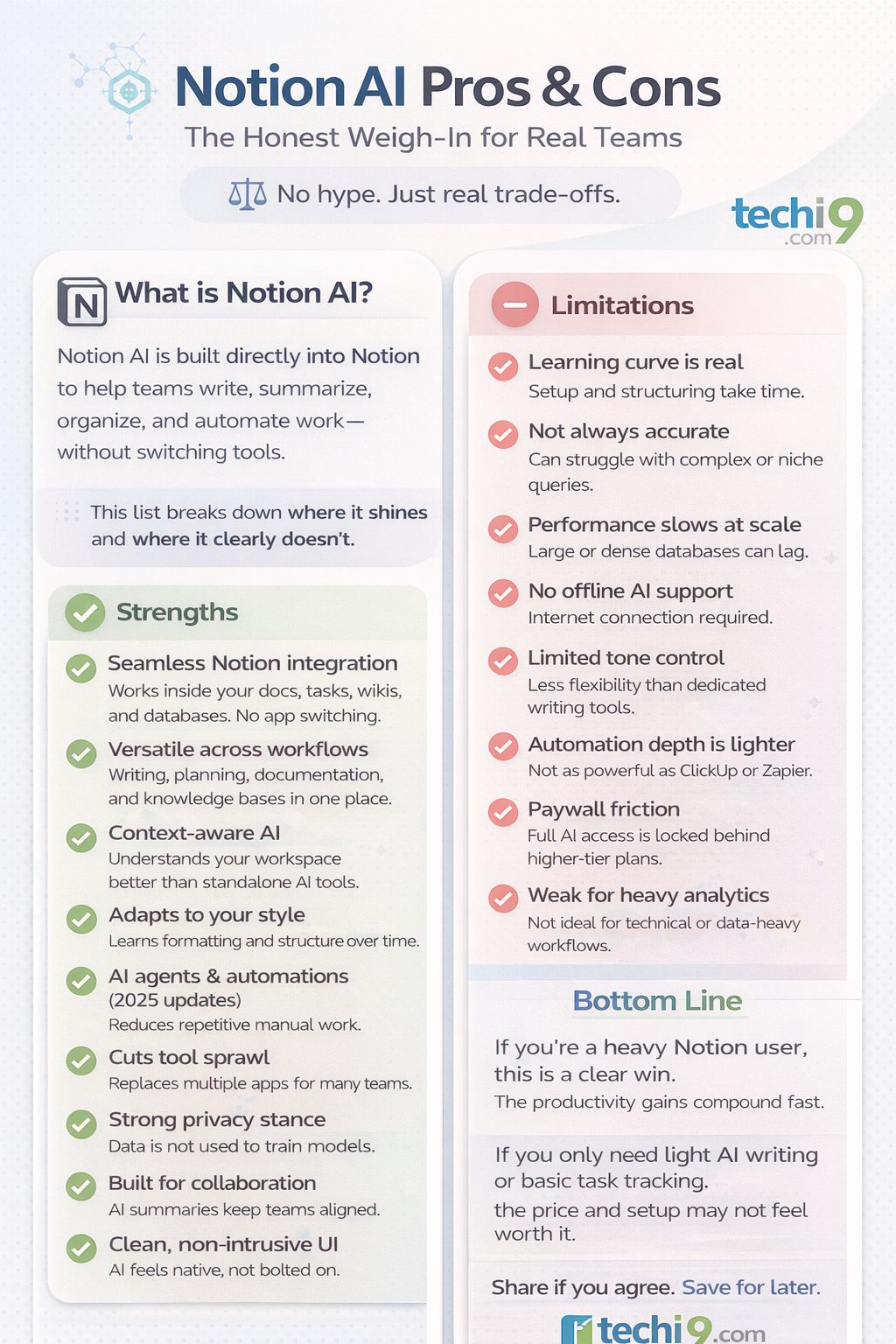
Pros and Cons: The Honest Weigh-In
| Strengths | Limitations |
| Seamless integration inside Notion. No app switching. | Learning curve. Setup and structuring take time. |
| Versatile. Works for writing, tasks, wikis, and databases. | Occasional inaccuracies on complex or niche queries. |
| Understands workspace context better than standalone AI tools. | Slower performance with very large or dense databases. |
| Adapts to your style and formatting over time. | No offline AI support. Internet required. |
| Strong privacy stance. Data is not used to train models. | Limited control over AI tone compared to dedicated writing tools. |
| AI agents and automations (2025 updates) reduce manual work. | Automation depth is lighter than tools like ClickUp or Zapier. |
| Cuts tool sprawl. Replaces multiple apps for many teams. | Full AI access locked behind higher-tier plans. |
| Great for collaboration. AI summaries help teams stay aligned. | Not ideal for heavy analytics or technical workflows. |
| Clean UI keeps AI from feeling intrusive. | Can feel overwhelming for first-time Notion users. |
Bottom line: If you are a heavy Notion user, this is a clear win. The productivity gains compound fast. If you only need light AI writing or simple task tracking, the price and setup may not feel worth it.
Real-World Use Cases
To judge Notion AI – Productivity and Automation Capabilities, it helps to see how it fits into daily work.
1. Content and marketing teams
- Brainstorm ideas inside databases and turn notes into outlines.
- Generate first drafts, then polish the voice manually.
- Summarize research into short briefs linked to each task.
- Use AI tags and summaries to sort content by theme or campaign.
2. Product and project teams
- Turn meeting calls into structured notes with pain points and ideas.
- Create short spec summaries for leadership reviews.
- Auto-update status notes and changelogs from databases.
3. Agencies, freelancers, and small teams
- Create customer areas using AI-based proposals and reports.
- Track project health or risks using AI properties.
- Share clear weekly summaries with minimal effort.
4. For Founders and Managers
- Summarize meetings
- Write internal updates
- Structure ideas
- Reduce admin work
5. For Students
- Notes
- Study summaries
- Essay drafts
- Research outlines
However, learning should stay honest and thoughtful.
Who Should Choose Notion AI?
Notion AI works best for teams living in docs, notes, and knowledge bases who want light automation.
Choose Notion AI – Productivity and Automation Capabilities if:
- Your work already runs on Notion pages and databases.
- You want AI that understands your workspace context.
- You need writing help plus simple automation in one place.
If deep project tracking or heavy integrations are your top priority, tools like ClickUp may suit you better, often alongside Notion rather than instead of it.
FAQs:
1. Is Notion AI good for productivity?
Yes. Notion AI enhances the level of productivity by automating writing, summarizing, and organizing work.
2. Can Notion AI replace ChatGPT?
No. However, it complements ChatGPT by working inside your workspace.
3. Is Notion AI safe to use for work data?
Notion follows strong security practices. Still, sensitive data should be reviewed carefully.
4. Does Notion AI work for teams?
Yes. Teams benefit from better collaboration, faster documentation, and clear summaries.
5. Is Notion AI worth paying for?
If you use Notion daily, the time saved often justifies the cost.
Wrapping It Up: Should You Jump In?
Notion AI turns a good tool into a serious workhorse. Its productivity and automation capabilities cut down busywork fast. Writing feels smoother. Tasks organize themselves. Teams stay in sync without chasing updates. It does not try to replace humans. Instead, it supports them where they already work.
That said, it is not for everyone. If you dislike setup or want a plug-and-play tool with zero thinking, this may feel heavy.
If you live inside Notion, this tool feels natural. If you value speed and clarity, it saves real time.
But if you are a creator, a manager, or someone who enjoys building smart systems, this is a strong yes. I’ve cleaned up my own mess with it. You probably can too. Try the free trial and see if it clicks.
Therefore, Notion AI is a smart investment for modern teams and individuals.