





Content creation must not be a factory process. However, for most teams, it still does. Ideas live in one doc. Drafts live somewhere else. Publishing is manual. Tracking performance is messy. As a result, good content gets delayed or never shipped.
The creation of content is endless. Brainstorming, drafts, editing, and completion. But what would you do if you could make it all quicker? Automate Your Content Workflow means using tech to handle repetitive tasks. This lets you focus on creativity.
Here, we will demonstrate that a complete system can be installed in 30 minutes. We will use AI automation and no-code tools. No coding. No tech headaches.
This is a practical tutorial on automating content workflows, not a theoretical one.
What is Automate Content Workflow?
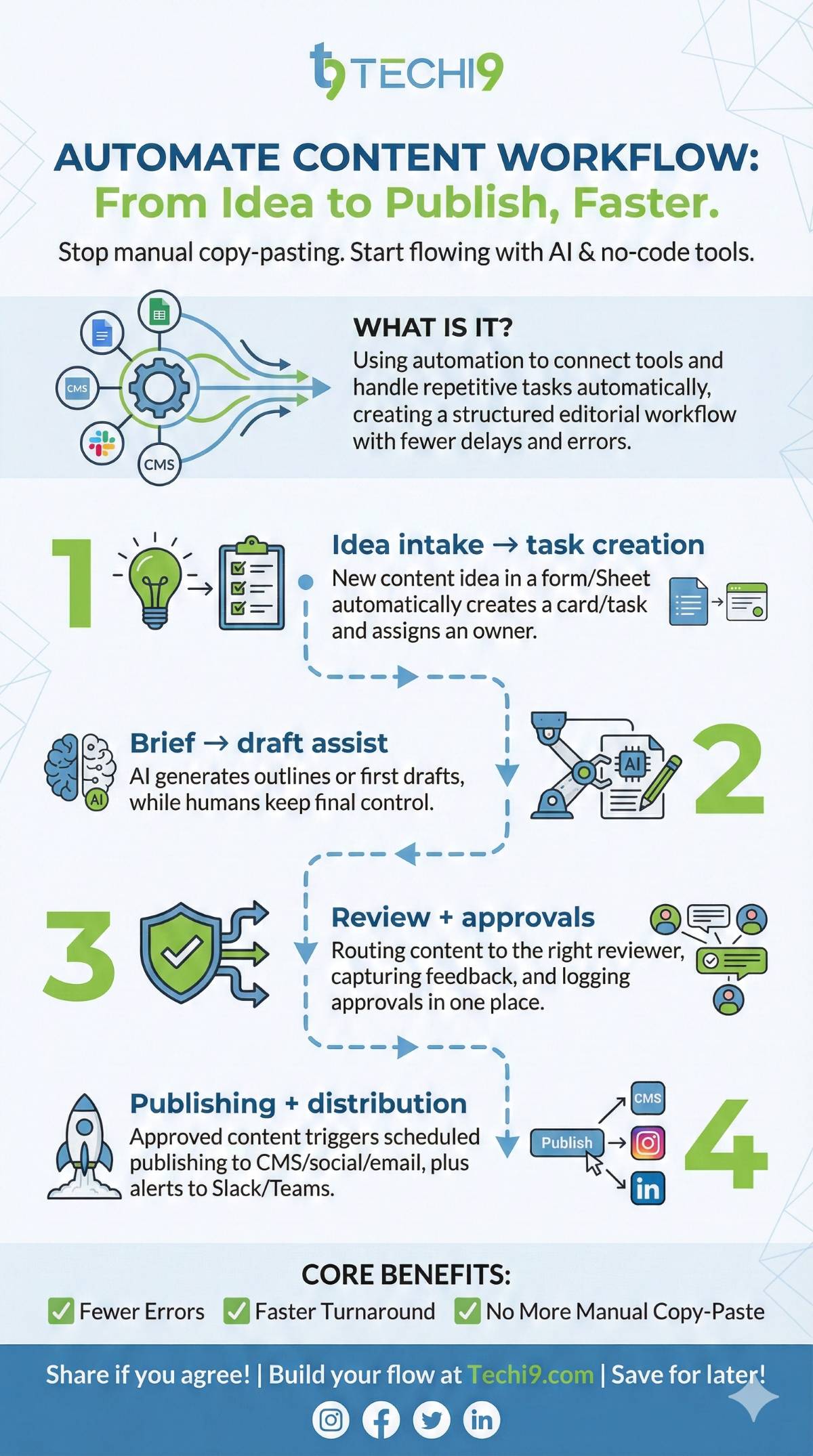
Automate content workflow means using AI and no-code tools to handle repetitive content tasks automatically, from idea generation and drafting to approvals and automated publishing.
Instead of manually moving content between Docs, Sheets, Slack, and a CMS, automation connects these tools so content flows through a structured editorial workflow with fewer delays, fewer errors, and faster turnaround.
What gets automated (practical examples)
- Idea intake → task creation: New content idea in a form/Sheet automatically creates a card/task and assigns an owner.
- Brief → draft assist: AI generates outlines or first drafts, while humans keep final control.
- Review + approvals: Routing content to the right reviewer, capturing feedback, and logging approvals in one place.
- Publishing + distribution: Approved content triggers scheduled publishing to CMS/social/email, plus alerts to Slack/Teams. (This is the “no more copy-paste between tools” win.)
Why Automate Content Workflow Now?
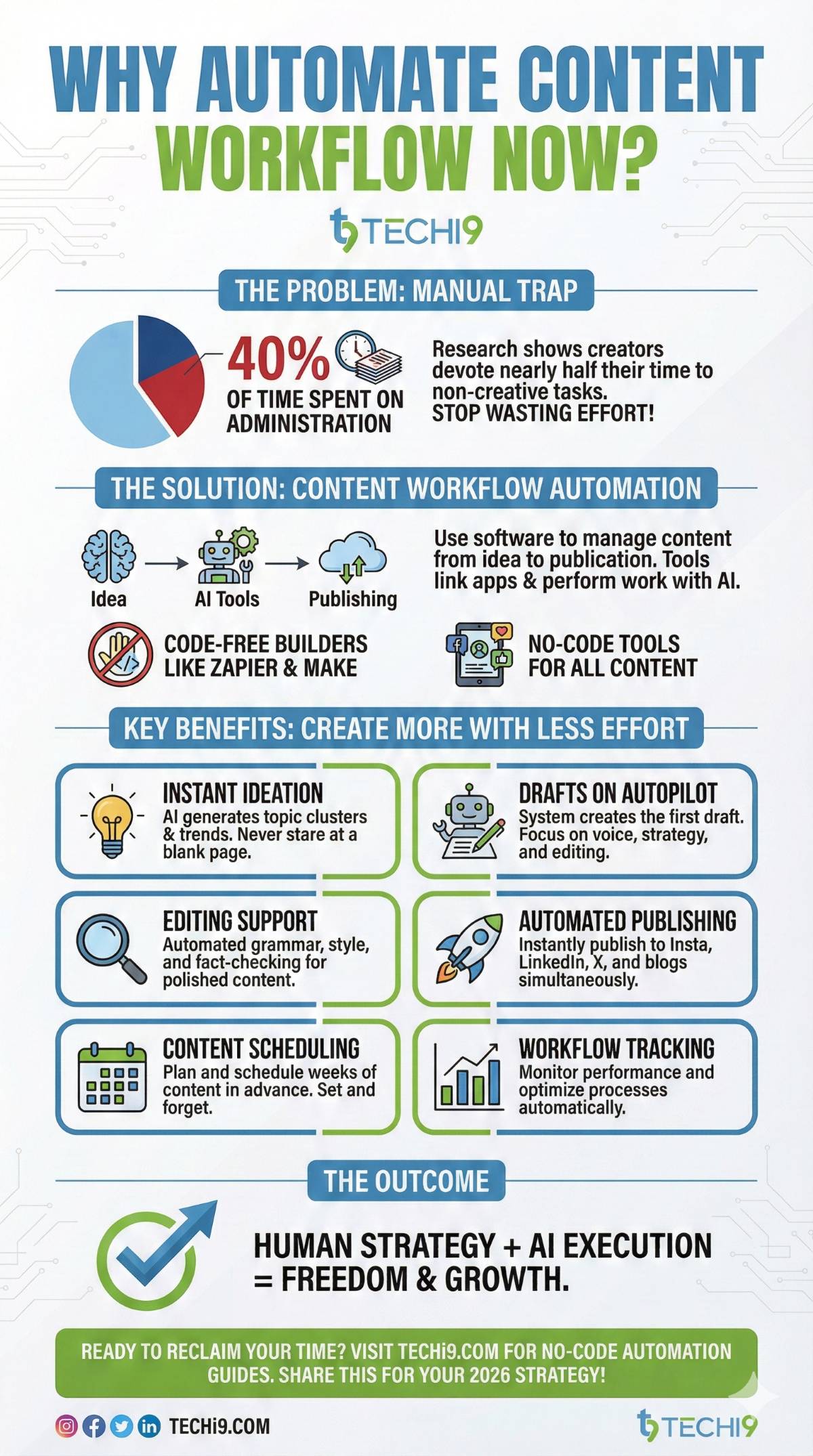
First, let’s define content workflow automation. It’s the process of using software to manage content from idea to publication. Tools link apps and perform the work with the help of AI.
In 2026, this will be easier than ever thanks to AI. As an example, code-free flow builders such as Zapier and Make exist. Moreover, no-code tools for content workflow automation have grown. They handle everything from blog posts to social media.
However, manual workflows waste time. Research indicates that creators devote 40% of their time to administration. Automation cuts that down. As a result, you produce more with less effort.
In simple terms, you let systems handle repeat work. Humans focus on thinking, editing, and strategy.
This includes:
- Idea generation
- Draft creation
- Editing support
- Automated content publishing
- Content scheduling automation
- Workflow tracking
Additionally, AI adds smarts. It can generate ideas or optimize for SEO. This guide focuses on quick setup for beginners.
As a result, content moves faster with fewer errors.
Tools You Need for Content Automation Tools Stack
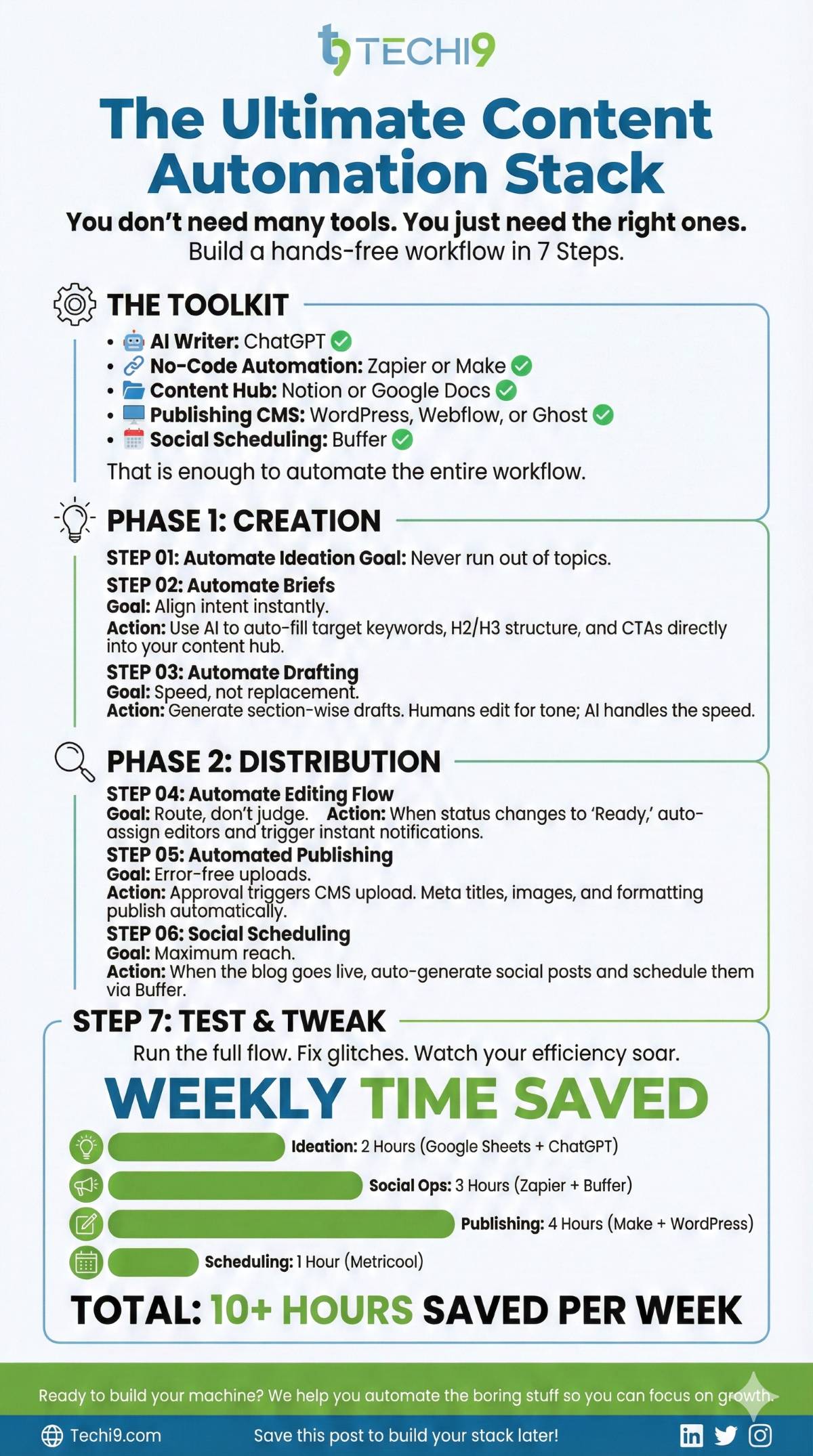
You do not need many tools. You just need the right ones.
Here is a simple, proven stack:
- AI writer: ChatGPT
- No-code automation: Zapier or Make
- Content hub: Notion or Google Docs
- Publishing CMS: WordPress, Webflow, or Ghost
- Social scheduling: Buffer
That is enough to automate the entire content workflow.
Step-by-Step Content Workflow Automation Tutorial
Step 1: Automate Content Ideas
Content ideas often stall teams. Therefore, automate ideation first.
Definition:
Content ideation automation uses AI to generate topics based on prompts, keywords, or trends.
How to Set It Up
- Create a Notion database called “Content Ideas”
- Add fields: Topic, Keyword, Status
- Use AI content automation with ChatGPT prompts
- Trigger ideas weekly using Zapier or Make
This supports:
- How to automate blog ideation
- Long-term planning
- Cleaner editorial workflow
Step 2: Automate Brief Creation
Briefs align writers and editors. However, manual briefs waste time.
Definition:
Automated brief creation uses AI to convert ideas into structured outlines.
What the AI Should Generate
- Target keyword
- Search intent
- H2 and H3 structure
- CTA suggestion
Use content automation tools to auto-fill briefs inside your content hub.
As a result, writers start faster and stay focused.
Step 3: Automate Draft Writing with AI
AI drafts save hours. However, they should assist, not replace thinking.
Definition:
Draft automation means using AI to create first versions based on approved briefs.
Best Practice
- Generate section-wise drafts
- Keep tone guidelines fixed
- Edit manually before approval
This step supports:
- How to automate blog writing
- Faster turnaround
- Consistent brand voice
AI handles speed. Humans handle quality.
Step 4: Automate Editing and Review Flow
Editing delays break workflows. Therefore, automate routing, not judgment.
Definition:
Editing automation routes drafts to editors automatically.
How It Works
- Draft status changes to “Ready for Review”
- Automation assigns the editor
- Notification triggers instantly
This strengthens:
- Editorial workflow
- Team accountability
- Smooth content operations
Editors focus on improving content, not chasing files.
Step 5: Automated Content Publishing
Publishing should never be manual.
Definition:
Automated content publishing pushes approved content live without human action.
Setup
- Approval status triggers CMS upload
- Meta title and description auto-filled
- Images attached from folder
This enables:
- Publishing automation
- Error-free uploads
- Faster go-live
As a result, content ships on time.
Step 6: Content Scheduling Automation for Social Media
Distribution matters as much as creation.
Definition:
Content scheduling automation shares content across channels automatically.
What to Automate
- Blog goes live
- Social posts auto-generated
- Scheduled across platforms
This supports:
- Automate social media content
- Consistent posting
- Wider reach
Step 7: Test and Tweak
Run full flow: Idea to post. Check each step.
Therefore, fix glitches now. Your automated content workflow runs smoothly.
| Step | Tool | Time Saved Weekly |
| Ideas | Google Sheets + ChatGPT | 2 hours |
| Social | Zapier + Buffer | 3 hours |
| Blog Publish | Make + WordPress | 4 hours |
| Schedule | Metricool | 1 hour |
How the Full Content Pipeline Looks
Modern content teams follow a connected pipeline where every step feeds the next. When automation content workflow is superimposed in the right way, nothing collapses, and nothing halts.
End-to-end flow:
- Idea generated – AI analyzes search trends, competitor gaps, internal data, and past performance to surface content ideas with demand. No guesswork.
- Brief created – Automated briefs include target keywords, intent, structure, word count, internal links, and tone. Writers start with clarity, not chaos.
- Draft written – AI drafts the first version based on the brief. Humans focus on insight, accuracy, and originality instead of blank-page anxiety.
- Review assigned – No-code tools auto-assign reviewers based on rules like topic, workload, or deadline. No chasing on Slack.
- Approved — Approval triggers are automated. Once marked approved, the content moves forward instantly.
- Published — CMS publishing happens automatically at the scheduled time with metadata, schema, and formatting intact.
- Distributed — Content is repurposed and distributed across email, social, and internal channels without manual copying.
Why this works:
Every step is connected. No spreadsheets. No “Did you check this?” messages. This is real content workflow automation, not theory.
Best Practices in Sustainable Content Operations
Automation is not an initial system.
- Review prompts monthly – Search intent shifts. Prompts that worked three months ago can quietly go stale.
- Audit workflows quarterly – Check for delays, unnecessary steps, and tool overlap. Simpler always scales better.
- Update tone and brand guides – AI needs current direction to stay aligned with evolving brand voice.
- Track results, not just output – Measure rankings, engagement, conversions, and content decay. Volume alone means nothing.
Result:
A content engine that stays sharp instead of slowly drifting off course.
Who Should Use This System
This automation setup is most valuable when content volume and consistency matter.
- Content marketers managing multiple campaigns
- SEO teams scaling informational and commercial pages
- Founders building authority without large teams
- Agencies handling multiple clients and deadlines
- Media companies publishing at high frequency
- Anyone managing volume who needs to automate content workflow without losing quality
Benefits of AI Content Automation
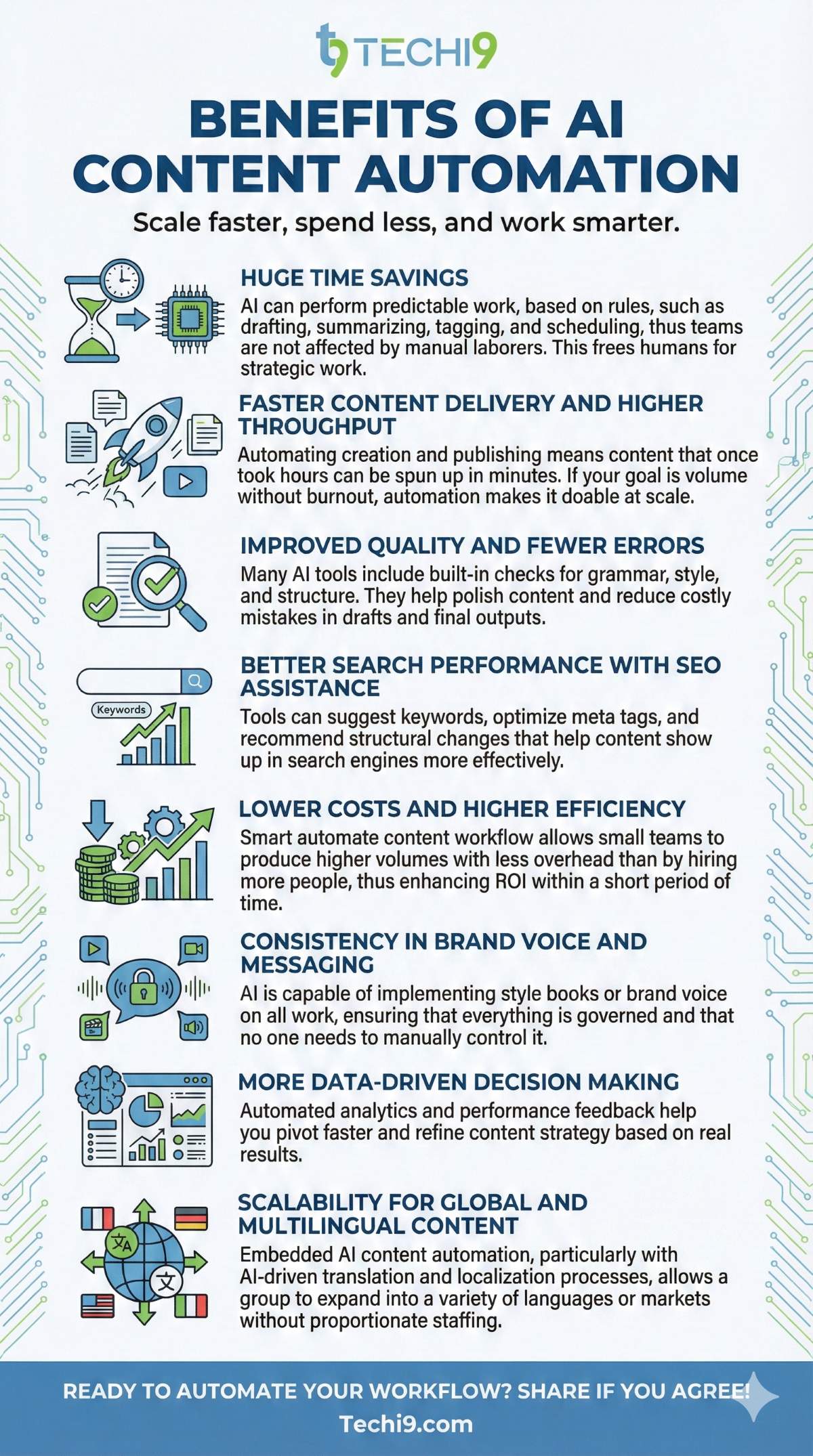
- Huge time savings on repetitive work : AI can perform predictable work, based on rules, such as drafting, summarizing, tagging, and scheduling, thus teams are not affected by manual laborers. This frees humans for strategic work.
- Faster content delivery and higher throughput : Automating creation and publishing means content that once took hours can be spun up in minutes. If your goal is volume without burnout, automation makes it doable at scale.
- Improved quality and fewer errors : Many AI tools include built-in checks for grammar, style, and structure. They help polish content and reduce costly mistakes in drafts and final outputs.
- Better search performance with SEO assistance : Tools can suggest keywords, optimize meta tags, and recommend structural changes that help content show up in search engines more effectively.
- Lower costs and higher efficiency : Smart automate content workflow allows small teams to produce higher volumes with less overhead than by hiring more people, thus enhancing ROI within a short period of time.
- Consistency in brand voice and messaging : AI is capable of implementing style books or brand voice on all work, ensuring that everything is governed and that no one needs to manually control it.
- More data-driven decision making : Automated analytics and performance feedback help you pivot faster and refine content strategy based on real results.
- Scalability for global and multilingual content : Embedded AI content automation, particularly with AI-driven translation and localization processes, allows a group to expand into a variety of languages or markets without proportionate staffing.
Common Mistakes to Avoid
AI content automation is a failure when the teams hurry up or get the purpose wrong. These are the most common breakdown points seen in real deployments.
- Overusing AI without editing : Raw AI output hurts trust, rankings, and brand credibility. Human review is not optional.
- Automating broken processes : If your manual workflow is messy, automation will only make the mess faster.
- Ignoring quality checks : No grammar checks, no fact verification, no SEO validation equals silent damage over time.
- No clear ownership : Automation still needs owners. If no one is accountable, things slip quietly.
- Reality check: Strong systems scale smoothly because they are designed before they are automated.
Best AI Content Automation Tools in 2026
These are the most applicable tools that must be in your consideration whenever you develop or maximize an automated content workflow.
Workflow and Publishing Automation
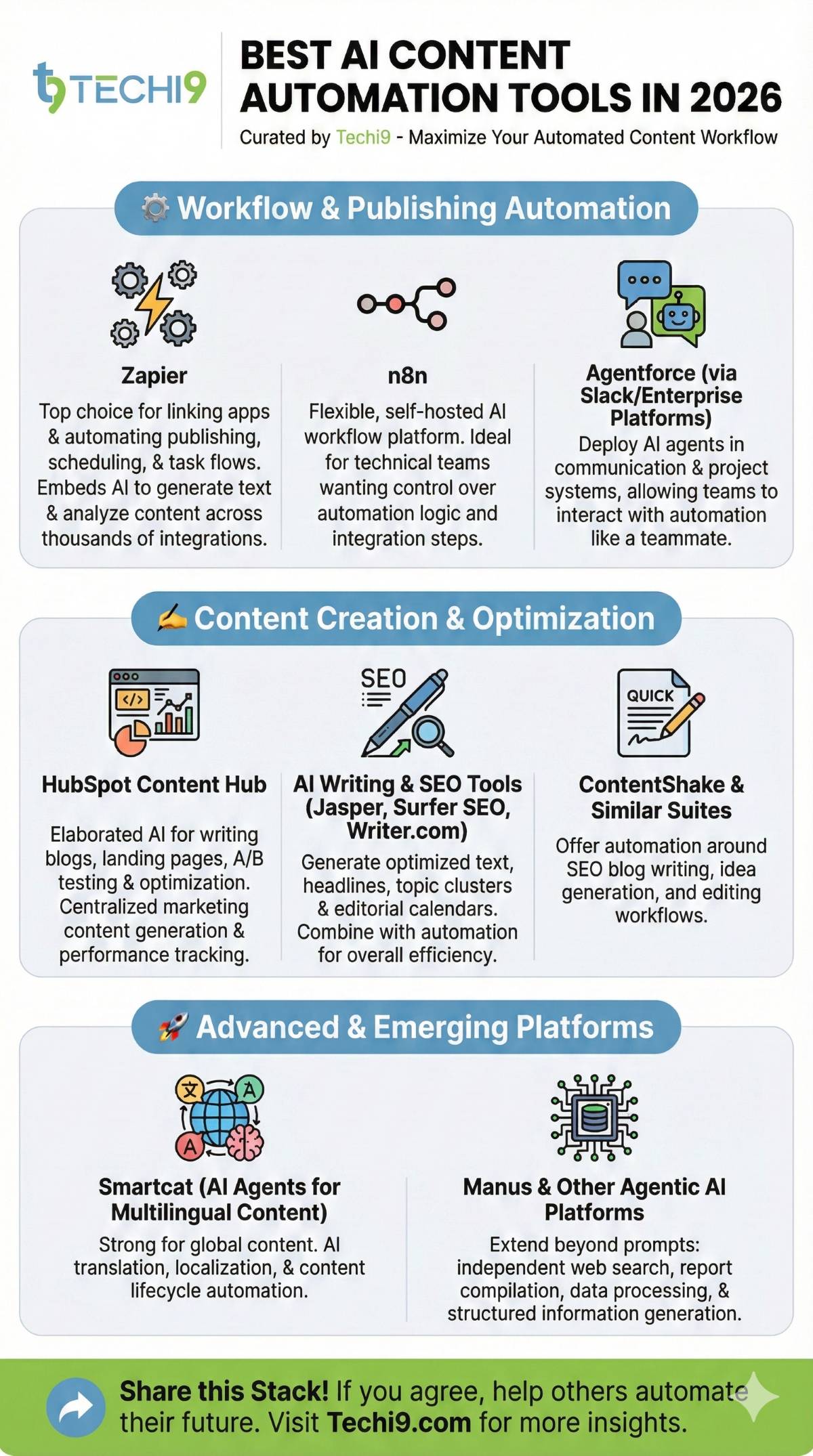
- Zapier
A top choice for linking apps and automating publishing, scheduling, and task flows. It now embeds AI features to generate text, analyze content, and recommend actions across thousands of integrations. - n8n
A more flexible AI workflow platform with a self-hosted option, great for technical teams that want control over automation logic and integration steps. - Agentforce (via Slack/enterprise platforms)
AI agents you can deploy within communication and project systems, letting teams interact with automation like they would with teammates.
Content Creation and Optimization
- HubSpot Content Hub
Elaborated on AI in writing blogs, landing pages, A/B test and optimization. Hands-on in terms of centralization of marketing content generation and tracking of performance. - AI Writing and SEO Tools (Jasper, Surfer SEO, Writer.com)
These tools assist in generating optimized text, headlines, topic clusters, and editorial calendars. They are often combined with workflows of automation to achieve overall efficiency. - ContentShake and Similar Suites
Offer automation around SEO blog writing, idea generation, and editing workflows.
Advanced & Emerging Platforms
- Smartcat (AI Agents for Multilingual Content)
Strong for organizations creating global content, with AI translation, localization, and content lifecycle automation. - Manus and Other Agentic AI Platforms
These extend beyond mere prompts, independent web source searches, report compilation, data processing, and the generation of structured information.
How to Choose the Right Tools
- Define your workflow needs first
Start by mapping where most manual effort is going. Tools that connect apps (Zapier, n8n) excel for integration, while purpose-built creation tools (HubSpot, Jasper) are better for editorial work. - Integration matters
The greater the chat of the tool with your CMS, analytics, and other team applications, the smoother the automation is going to run. - Balance automation with human oversight
Pure AI content automation is time-saving, although human review and philosophy are helpful to most high-impact materials.
Case studies & real wins (quick points)
- Zapier → automated social posting that saved time and scaled reach.
Zapier’s guides and examples show how teams automate publishing (blog → all social channels) and reuse content to save hours weekly — a foundation many creators use to grow audiences without hiring extra staff. - FlowGenius / smaller teams: measurable time savings.
Independent writeups report small companies saving 8–10+ hours per week after wiring Zapier to scheduling tools and social platforms — freeing time for strategy rather than manual posting. - Make (formerly Integromat) → end-to-end content workflows cut production time dramatically.
Make’s published client stories show teams using Google Docs + AI + Make to save ~5–6 hours per article and increase blog output by ~167% without hiring. That’s a real productivity multiplier for agencies and in-house teams. - SMEs and small businesses see direct cost/efficiency wins.
Recent roundups of SME AI adoption show clear ROI: automation reduces repetitive headcount needs and operational waste, letting small teams deliver more marketing with the same budget.
Future of content automation (what 2026 is showing)
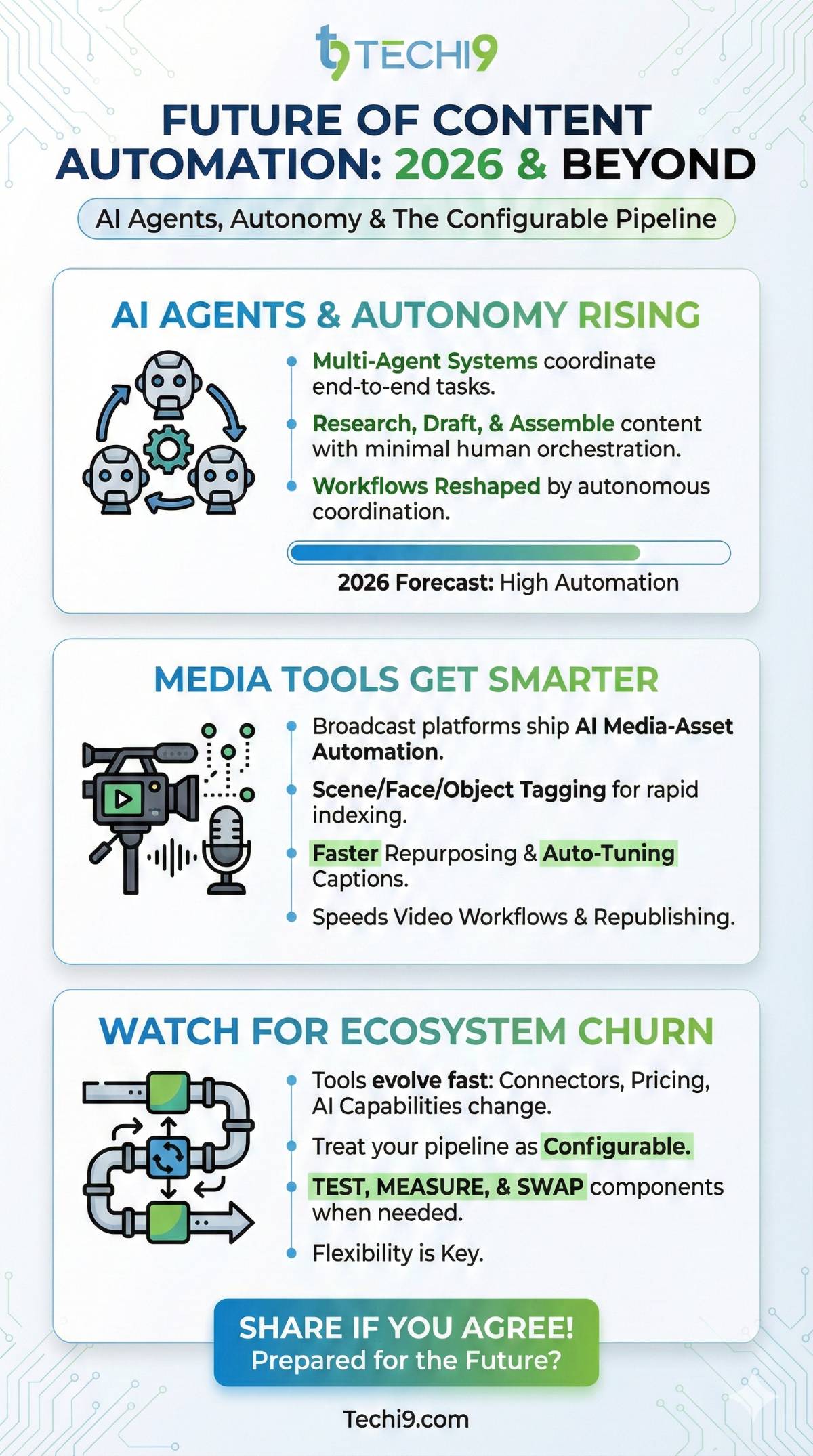
- AI agents and autonomy are rising. Vendors and cloud reports predict multi-agent systems (agents that coordinate tasks end-to-end) will reshape workflows — expect more systems that can research, draft, and assemble content with minimal human orchestration.
- Media tools will get smarter about audio/video. Broadcast and media platforms are shipping AI media-asset automation (scene/face/object tagging, faster repurposing, auto-tuning captions), which speeds video workflows and republishing.
- Watch for ecosystem churn. Tools evolve fast — connectors, pricing, and AI capabilities change often. Treat your pipeline as configurable: test, measure, and swap components when needed.
FAQs: Top Questions on Automate Content Workflow
Here are five trending questions. Based on recent searches.
1. What is the best way to automate content workflow for beginners?
Start with Zapier – connect apps + AI in minutes, no code needed. Build one tiny workflow first (e.g. RSS → tweet) to gain quick confidence.
2. How do I automate social media content without coding?
Use Make or Gumloop → calendar trigger → AI writes → auto-schedule. Add Buffer for smart timing and tone tweaks.
3. Are there free content automation tools?
Yes, n8n is fully open-source and self-hostable with powerful AI nodes at no cost.
Zapier offers a basic free tier (limited tasks), while Make and some others provide generous free plans for testing. Start with n8n community templates for content creation — they’re ready-made and save huge setup time.
4. Can AI handle content scheduling automation fully?
Mostly yes — tools like Buffer, Hootsuite, or AI agents in Make/Gumloop handle generation, optimization, and posting end-to-end. Advanced setups use performance data to auto-adjust schedules and even repurpose content.
5. What’s the ROI of AI content automation?
Saves hours weekly — for a creator, that’s easily $100+ in time value, often paying back fast (many see 200-400% ROI in year one). Teams report 60-80% faster production and higher output while cutting costs significantly.
Track metrics like time saved vs. tool cost — most users break even in weeks and scale output 3-5x with quality oversight.
Conclusion
Want to automate content workflow and eliminate hours lost on manual work? Be small, go big, and leave the smart systems to create, publish, and distribute on your behalf. When you automate content workflow, you publish faster, scale consistently, and reduce stress without growing your team. If you want, I can help you automate content workflow with a setup tailored exactly to your niche or team.


